
After logging into your SprayCapture or SprayBrush app with your valid username and password, you will find the AI Assistant and the Help button located in the bottom-left corner of the screen.
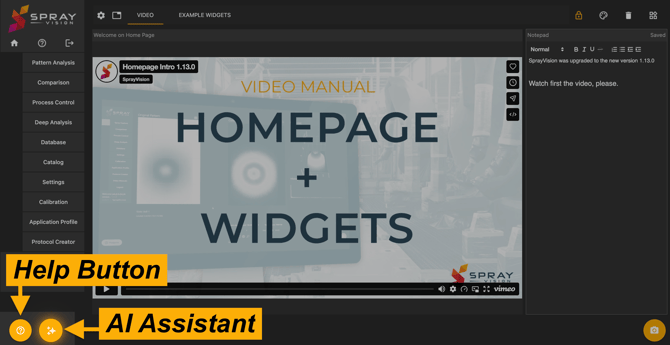
SprayVision AI Assistant
The SprayVision AI Assistant provides AI assistance using only the verified content from the SprayVision Knowledge Base. This chat-based AI agent can help with your use cases, tool navigation, or with finding relevant help articles in the Knowledge Base.
ℹ️ NOTE – The SprayVision AI Assistant is currently available on demand only and must first be enabled by the SprayVision technical team. To request access, contact support@sprayvision.com.
⚠️ IMPORTANT – The content generated by the AI Assistant may contain inaccuracies or errors; please verify important information before relying on it.
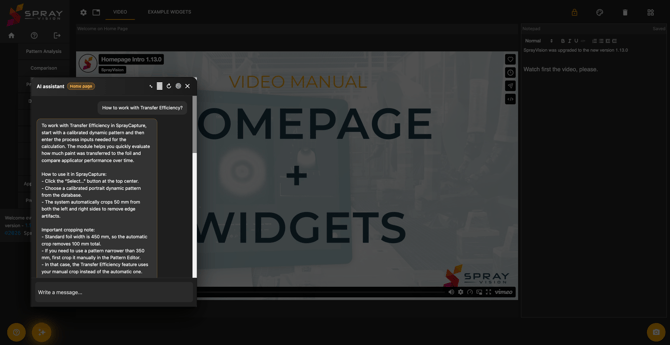
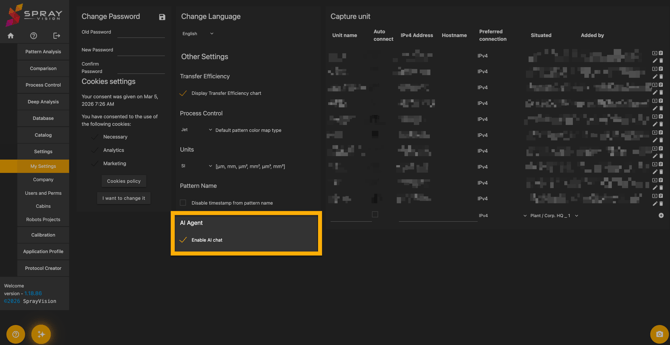
If the AI Assistant feature is active for your account, it can be enabled or disabled from displaying on your interface any time from the "My Settings" module.
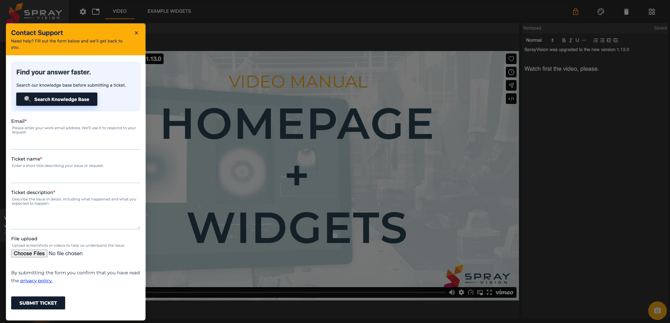
Help Button – Direct Contact Form
If you need direct human support, please use the built-in Help Button's Contact form to submit a request to our team.
- Your request will be forwarded to the SprayVision support queue.
- A team of trained technicians monitors this system and will respond as soon as possible, in the maximum of 24 hours for the first response.
- After resolution, you’ll have the option to rate the level of our support, which directly influences how we improve our services.
- Alternatively, you can send your request directly via email to support@sprayvision.com.
Knowledge Base
Clicking on the Knowledge Base link in the Help Button or via the AI Assistant chat opens direct access to the SprayVision Knowledge Base, a curated and regularly updated library of technical documentation.
It includes the most recent instructions, workflows, and reference materials aligned with continuous improvements in software functionality. For more information, visit our article on How to Work with the SprayVision Knowledge Base.
If you require any further clarification, encounter unexpected behavior, or would like assistance with specific parts of the workflow, please do not hesitate to contact our support team at support@sprayvision.com or create a ticket via the widget.
Our team is ready to assist you and ensure that your experience with SprayVision is as smooth and effective as possible.